Backup Buddy
Peace of mind for your cards and files.
The real, free checklist opens on its own page, and it saves beautifully to your home screen.
01What it does
Peace of mind, one tick at a time.
One clear checklist
Snappy, tap-to-green steps that work whatever your setup. Each one has a plain-English descriptor, and you can skip what doesn't apply to you.
Built-in count checks
Prompts to note your frame counts before you offload, and verify them after, so you know for certain every image carried through.
A calm progress bar
Tick each step and watch the shoot get safer. A quiet 'all safe, you can breathe' at the end.
Yours and private
It runs in your browser and remembers your place on your device. No account, nothing leaves your machine.
02The checklist
Nine steps, card to complete.
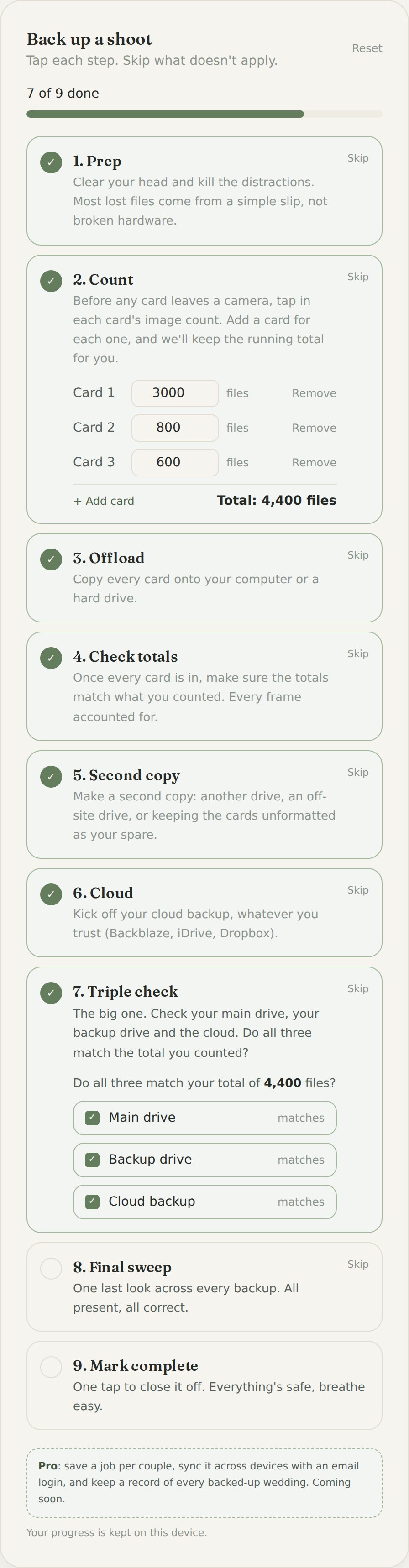
One clear run for every shoot, whatever your setup. Tap a step to turn it green, or skip what doesn't apply. Skip a second copy or the cloud and it'll gently flag it.
- 01
Prep
Clear your head and kill the distractions. Most lost files come from a simple slip, not broken hardware.
- 02
Count
Before any card leaves a camera, tap in each card's image count. Add a card for each one, and we'll keep the running total for you.
- 03
Offload
Copy every card onto your computer or a hard drive.
- 04
Check totals
Once every card is in, make sure the totals match what you counted. Every frame accounted for.
- 05
Second copyDon't skip lightly
Make a second copy: another drive, an off-site drive, or keeping the cards unformatted as your spare.
- 06
CloudDon't skip lightly
Kick off your cloud backup, whatever you trust (Backblaze, iDrive, Dropbox).
- 07
Triple check
The big one. Check your main drive, your backup drive and the cloud. Do all three match the total you counted?
- 08
Final sweep
One last look across every backup. All present, all correct.
- 09
Mark complete
One tap to close it off. Everything's safe, breathe easy.
03How it helps you
The end of that nagging doubt.
You know the feeling: cards still in the bag, half-sure everything's copied, not quite able to relax. A routine you trust, run the same way every time, turns that doubt into a clear, calm 'yes, it's safe'.
04Behind the build
A few things I thought about.
- It started as the exact checklist I run after every wedding. The worst feeling in this job is a card that won't read, and a good routine is the only thing that stops it becoming a disaster.
- There's no single 'right' backup setup, so the free beta gives you a few honest examples rather than one rigid way. Pick the one closest to how you actually work.
- Every routine nudges you to count frames before you offload and verify them after. It's the step people skip, and it's the one that catches a silent failure.
- Nothing gets formatted until copies are verified. Until then, your cards are a free extra backup, so there's never a reason to rush.
- Like the Focus Timer, the deeper, life-shaping bits (saving your own routines, per-couple jobs, syncing everywhere) are what a paid Pro is for. The free tool stays genuinely useful on its own.
05Where it could go
Ideas for a Pro version.
The free checklist is genuinely useful on its own. Here's where a paid Pro could take it. Your feedback shapes what gets built.
Your own routines (Pro)
Build and save your own backup routine, or a universal one that pulls through automatically every time you start a new job.
Jobs per couple (Pro)
Start a job with the couple's names, then track that shoot's backup from card to cloud, with a clear visual of how far through you are.
Sync with a login (Pro)
A light email login (the same magic-link idea as the timer) so your routines and job progress follow you across devices.
Spot the gaps (Pro)
Point it at your setup and it flags the risks: three drives all under one roof and no cloud copy, say, or where you could switch providers and save money.
Would this earn a place in your workflow?
Tell me what your backup routine looks like, what's missing, and what you'd want from a Pro version. It shapes what I build next.